


If you’ve built AI agents, you’ve probably seen this: your agent handles simple tasks well, but struggles with complex ones. It might try to run everything in order when it should run tasks in parallel, or it might not know which tool to use. Sometimes, it just can’t keep track of everything in a multi-step task.
The problem usually isn’t your agent’s intelligence or your prompt design. It’s the workflow. How agents coordinate, delegate, and carry out tasks is just as important as the agents themselves. Knowing agentic workflows and patterns is what turns a basic demo into a system that can handle real-world challenges.
In this article, we’ll explain the six most common agentic workflows, look at the patterns behind them, and show you when to use each one.
TLDR: Agentic Workflows Quick Reference
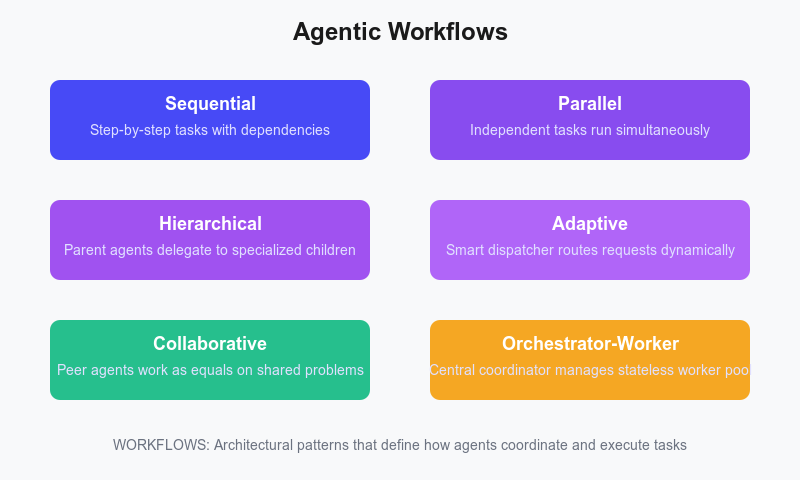
6 Core Workflows:
- Sequential: Step-by-step tasks with clear dependencies (document pipelines, ETL)
- Parallel: Independent tasks run simultaneously (multi-source data aggregation)
- Hierarchical: Parent agents delegate to specialized child agents (travel planning, software dev)
- Adaptive/Routing: Smart dispatcher routes requests to appropriate specialists (customer support)
- Collaborative: Peer agents work as equals, combining diverse perspectives (code review, investment analysis)
- Orchestrator-Worker: Central coordinator manages stateless worker pool (web scraping, distributed testing)
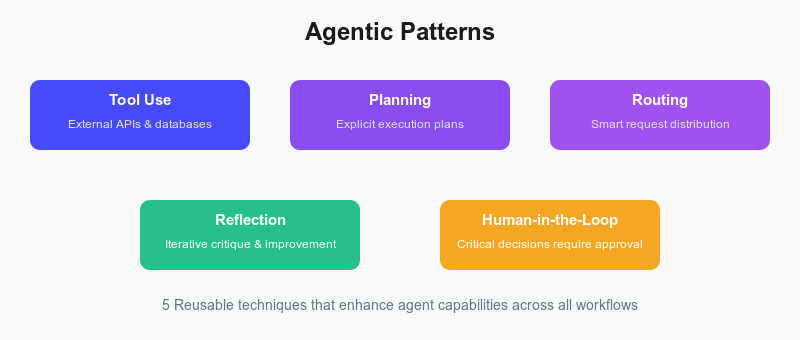
5 Essential Patterns:
- Tool Use: Agents interact with external systems via defined interfaces
- Planning: Explicit execution plans before action for complex tasks
- Routing: Intelligent request distribution to optimize cost and quality
- Reflection: Iterative critique and improvement for high-stakes outputs
- Human-in-the-Loop: Critical decisions require human approval
Key Decision Factors:
- Task dependencies → Sequential
- Independent subtasks → Parallel
- Complex specialization → Hierarchical
- Variable inputs → Adaptive
- Multi-perspective analysis → Collaborative
- Large-scale coordination → Orchestrator-Worker
What is an Agentic Workflow?
An agentic workflow is a way to design how agents and tools work together to complete tasks. It’s like the control flow for your AI system. It sets out who does what, in what order, and how information moves between parts.
Agent workflows are different from agent types or personality settings. For example, a "research agent" describes a role, not a workflow. A workflow is the process a research agent uses to break down a question, use tools, collaborate with other agents, and produce a final answer.
Why do workflows matter? Real-world tasks are rarely just one step. For example, if you ask an agent to "analyze our Q3 sales and compare them to industry benchmarks," it needs to:
- Break down the request into subtasks
- Fetch internal sales data
- Search for industry benchmark data
- Process and compare both datasets
- Synthesize findings into a coherent report
Without a workflow, your agent might try to do everything at once and fail, or make random tool calls in the hope of the best. A good workflow gives your system structure and predictability, helping it handle failures smoothly.
The 6 Most Common Agentic Workflows
Let’s go through the six most common agent workflows you’ll use when building agent systems. For each one, we’ll explain what it does, when to use it, and when not to use it, along with real-world examples.
Sequential / Prompt Chaining Workflow
Sequential workflows, also known as prompt chaining, run tasks one after another, with each step’s output becoming the next step’s input. This is the simplest and most predictable workflow pattern. It’s like an assembly line, where each agent does its part before handing off to the next.
The main advantage is predictability: you always know what happens and when. If something goes wrong, you can easily find which step failed. This makes sequential workflows ideal for processes with clear dependencies, where Step B truly needs Step A’s output.
Agent A completes its task and passes the results to Agent B, which processes them and passes them to Agent C. For example, in a content creation pipeline, one agent researches a topic, another drafts an article, a third edits it, and a final agent formats it for publication.
// Research agent
const researchAgent = new LlmAgent({
  name: "research_agent",
  description: "Researches topics thoroughly",
  instruction: "Find and summarize key information about the given topic",
  tools: [new GoogleSearch()],
  model: "gemini-2.5-flash",
});

// Writing agent
const writerAgent = new LlmAgent({
  name: "writer_agent",
  description: "Writes articles based on research",
  instruction: "Create a well-structured article using the research provided",
  model: "gpt-4o",
});

// Editor agent
const editorAgent = new LlmAgent({
  name: "editor_agent",
  description: "Edits and polishes content",
  instruction: "Improve clarity, fix grammar, and ensure consistent tone",
  model: "claude-sonnet-4",
});

// Sequential workflow
const contentPipeline = AgentBuilder.create("content_pipeline")
  .withDescription(
    "A pipeline that sequentially processes content through research, writing, and editing agents"
  )
  .withInstruction(`Process content in stages:
    1. research_agent: Research the topic and summarize findings
    2. writer_agent: Write an article based on the research
    3. editor_agent: Edit and polish the article for publication`)
  .asSequential([researchAgent, writerAgent, editorAgent])
  .build();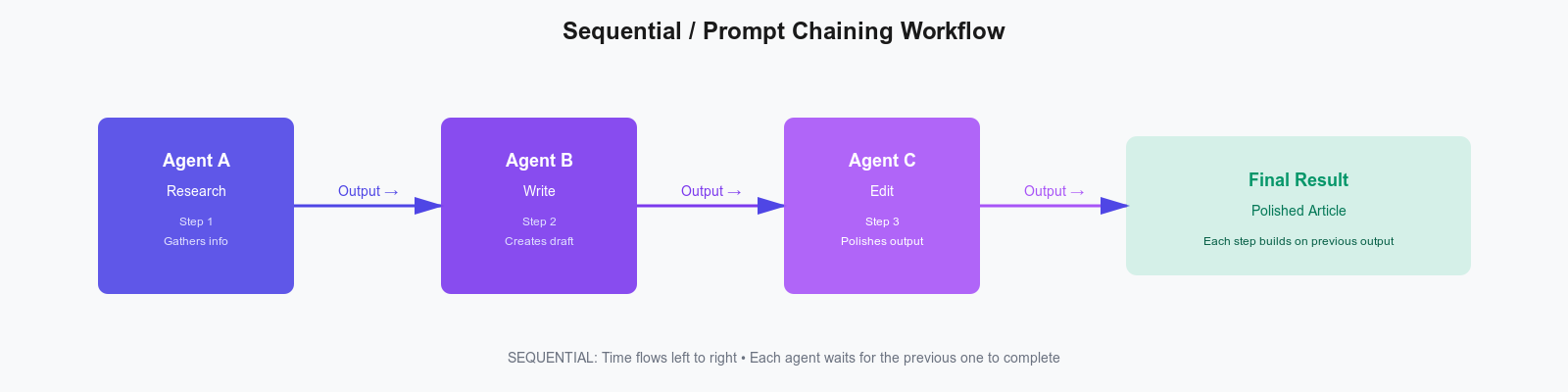
Sequential workflows work best for tasks with clear dependencies where each step builds on the previous one. Think document processing pipelines, customer onboarding flows, and data ETL processes.
You should skip this approach when tasks are independent or when speed is critical, as its linear nature can create bottlenecks.
Parallel Execution Workflow
Parallel workflows run multiple independent tasks concurrently, then combine their results. This approach is best when tasks don’t depend on each other. Instead of waiting for one agent to finish, both can work simultaneously, reducing execution time significantly.
The key is to know when tasks are truly independent. Parallel workflows work best for I/O-bound operations, such as API calls or database queries, where network delays are the main issue. The downside is that you need extra logic to handle different completion times and to combine results that might conflict.
A market research system, for example, simultaneously queries news APIs, financial databases, and social media, then combines the findings into a single report, completing in the time of the slowest source rather than the sum of all sources.
// News analysis agent
const newsAgent = new LlmAgent({
  name: "news_agent",
  description: "Analyzes news articles for market sentiment",
  tools: [new GoogleSearch()],
  model: "gemini-2.5-flash",
});

// Financial data agent
const financeAgent = new LlmAgent({
  name: "finance_agent",
  description: "Fetches and analyzes financial metrics",
  tools: [new HttpRequestTool()],
  model: "gpt-4o",
});

// Social sentiment agent
const socialAgent = new LlmAgent({
  name: "social_agent",
  description: "Analyzes social media sentiment",
  tools: [new GoogleSearch()],
  model: "claude-sonnet-4",
});

// Parallel workflow
const marketResearch = AgentBuilder.create("market_research")
    .withDescription("Conducts market research by analyzing news, financial data, and social sentiment in parallel")
    .withInstruction(`Simultaneously gather and analyze data from multiple sources:
      - news_agent: Analyze recent news articles for market sentiment
      - finance_agent: Fetch and analyze key financial metrics
      - social_agent: Analyze social media sentiment about the market`)
  .asParallel([newsAgent, financeAgent, socialAgent])
  .build();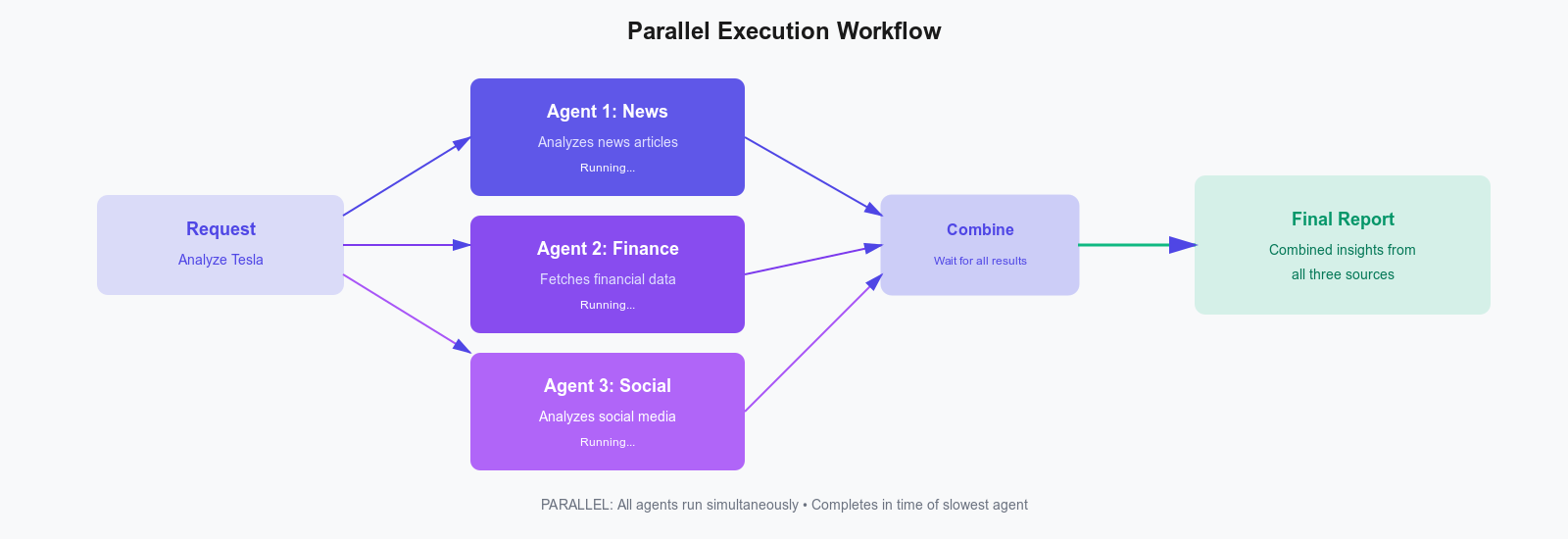
Parallel execution shines when tasks are genuinely independent, and speed trumps cost considerations. Perfect for multi-source data aggregation, competitive analysis, and batch processing operations.
Avoid this pattern when tasks depend on each other or require strict ordering—unpredictable completion times make debugging a nightmare.
Hierarchical Workflow
Hierarchical workflows break complex tasks into smaller subtasks, with parent agents assigning work to specialized child agents. This forms a tree-like structure, similar to how organizations handle big projects.
This pattern works best when problems can be split into clear areas, and no single agent has all the needed knowledge or tools. It’s a "divide and conquer" approach: a coordinator manages the process while experts handle their parts. The hierarchy can have several levels, making systems easier to understand, test, and expand.
A travel planning system shows this approach in action. The root agent delegates to flight, hotel, and activities specialists, each of which may further delegate to vendor-specific sub-agents, with all results flowing back up to create a comprehensive itinerary.
// Flight booking agent
const flightAgent = new LlmAgent({
  name: "flight_agent",
  description: "Searches and books flights",
  tools: [new GoogleSearch(), new HttpRequestTool()],
  model: "gpt-4o",
});

// Hotel booking agent
const hotelAgent = new LlmAgent({
  name: "hotel_agent",
  description: "Searches and books hotels",
  tools: [new GoogleSearch(), new HttpRequestTool()],
  model: "gpt-4o",
});

// Activities agent
const activitiesAgent = new LlmAgent({
  name: "activities_agent",
  description: "Recommends local activities and attractions",
  tools: [new GoogleSearch()],
  model: "gemini-2.5-flash",
});

// Root travel planner
const travelPlanner = AgentBuilder.create("travel_planner")
  .withDescription("Plans complete travel itineraries")
  .withInstruction(`You are a travel coordinator. Analyze user requests and delegate:
    - Flight searches to flight_agent
    - Hotel searches to hotel_agent
    - Activity recommendations to activities_agent
    Coordinate all sub-agents and compile a comprehensive travel plan.`)
  .withSubAgents([flightAgent, hotelAgent, activitiesAgent])
  .withModel("claude-sonnet-4")
  .build();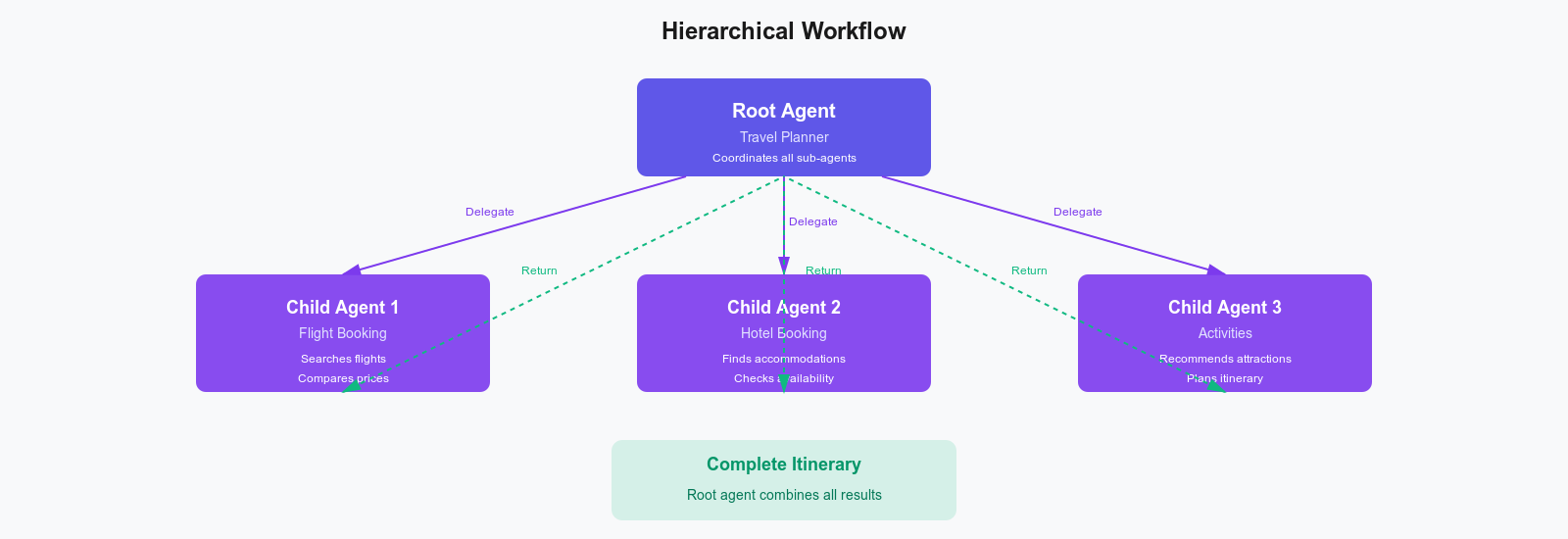
Choose hierarchical workflows for complex problems that naturally split into specialized domains. Ideal for software development workflows, legal document analysis, and enterprise sales processes.
Stick with simpler patterns when tasks don't need specialization or when coordination overhead outweighs the benefits.
Adaptive / Dynamic Routing Workflow
Adaptive workflows or dynamic routing workflows make runtime decisions about which agent handles each request based on input characteristics. The execution path isn't predetermined—it follows the "smart dispatcher" pattern.
Unlike hierarchical workflows that delegate to multiple agents, adaptive workflows route each request to exactly one appropriate handler. This enables efficient resource allocation: simple queries go to cheaper models, specialized tasks go to domain experts. Well-designed routing improves cost efficiency and quality.
Consider a customer support system that analyzes ticket content and routes it to billing, technical support, or sales based on whether it mentions payments, bugs, or product features.
// Billing support agent
const billingAgent = new LlmAgent({
  name: "billing_agent",
  description: "Handles billing and payment inquiries",
  instruction: "Assist users with invoices, payments, refunds, and subscription issues",
  model: "gpt-4o",
});

// Technical support agent
const techAgent = new LlmAgent({
  name: "tech_agent",
  description: "Provides technical support",
  instruction: "Help users troubleshoot technical issues with our product",
  tools: [new GoogleSearch()],
  model: "claude-sonnet-4",
});

// Sales agent
const salesAgent = new LlmAgent({
  name: "sales_agent",
  description: "Handles sales inquiries",
  instruction: "Answer questions about features, pricing, and product capabilities",
  model: "gemini-2.5-flash",
});

// Adaptive router
const supportRouter = AgentBuilder.create("support_router")
  .withDescription("Routes support requests to specialized agents")
  .withInstruction(`Analyze the user's message and route to the appropriate agent:
    - Billing questions (payments, refunds, invoices) → billing_agent
    - Technical problems (bugs, errors, troubleshooting) → tech_agent
    - Product questions (features, pricing, capabilities) → sales_agent
    Select the most appropriate agent based on the request content.`)
  .withSubAgents([billingAgent, techAgent, salesAgent])
  .withModel("gpt-4o")
  .build();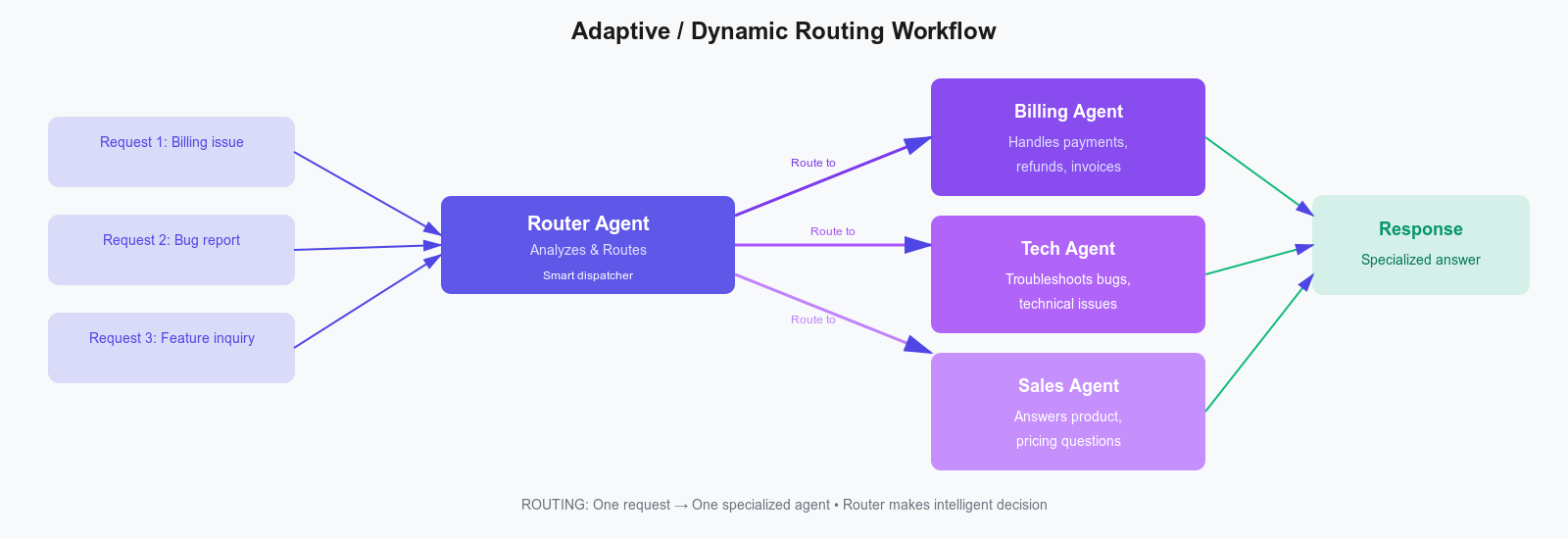
Adaptive routing makes sense when inputs vary widely and cost optimization matters. It is great for email triage systems, medical diagnosis routing, and code review systems.
You should not use it if you need predictable behavior or when the routing logic costs more than it saves.
Collaborative / Multi-agent Workflow
Collaborative workflows or multi-agent workflows, as the name suggests, involve multiple agents working together on a shared problem as equals. Unlike hierarchical workflows, there's no boss-subordinate relationship. Peer agents contribute different perspectives, producing a more robust solution than any single agent could.
The power lies in combining diverse viewpoints. A security expert agent sees vulnerabilities that a performance optimizer agent might miss. The challenge is coordination without hierarchy and resolving conflicts when recommendations contradict each other.
A code review system illustrates this perfectly. Security, performance, and style agents all review the same code independently, each contributing specialized findings to create a comprehensive multi-perspective review.
// Security reviewer
const securityAgent = new LlmAgent({
  name: "security_agent",
  description: "Reviews code for security vulnerabilities",
  instruction: "Identify security issues like SQL injection, XSS, auth bypasses, and data leaks",
  model: "claude-sonnet-4",
});

// Performance reviewer
const performanceAgent = new LlmAgent({
  name: "performance_agent",
  description: "Reviews code for performance issues",
  instruction: "Identify performance bottlenecks, inefficient algorithms, and optimization opportunities",
  model: "gpt-4o",
});

// Style reviewer
const styleAgent = new LlmAgent({
  name: "style_agent",
  description: "Reviews code for style and best practices",
  instruction: "Check for code style violations, naming conventions, and TypeScript best practices",
  model: "gemini-2.5-flash",
});

// Collaborative review workflow
const codeReviewTeam = AgentBuilder.create("code_review_team")
  .withDescription("Collaborative code review system")
  .withInstruction(`You are part of a code review team.
    Each agent reviews the same code independently:
    - security_agent focuses on security vulnerabilities
    - performance_agent focuses on performance issues
    - style_agent focuses on code style and best practices
    Combine all findings into a comprehensive review report.`)
  .asParallel([securityAgent, performanceAgent, styleAgent])
  .build();
`;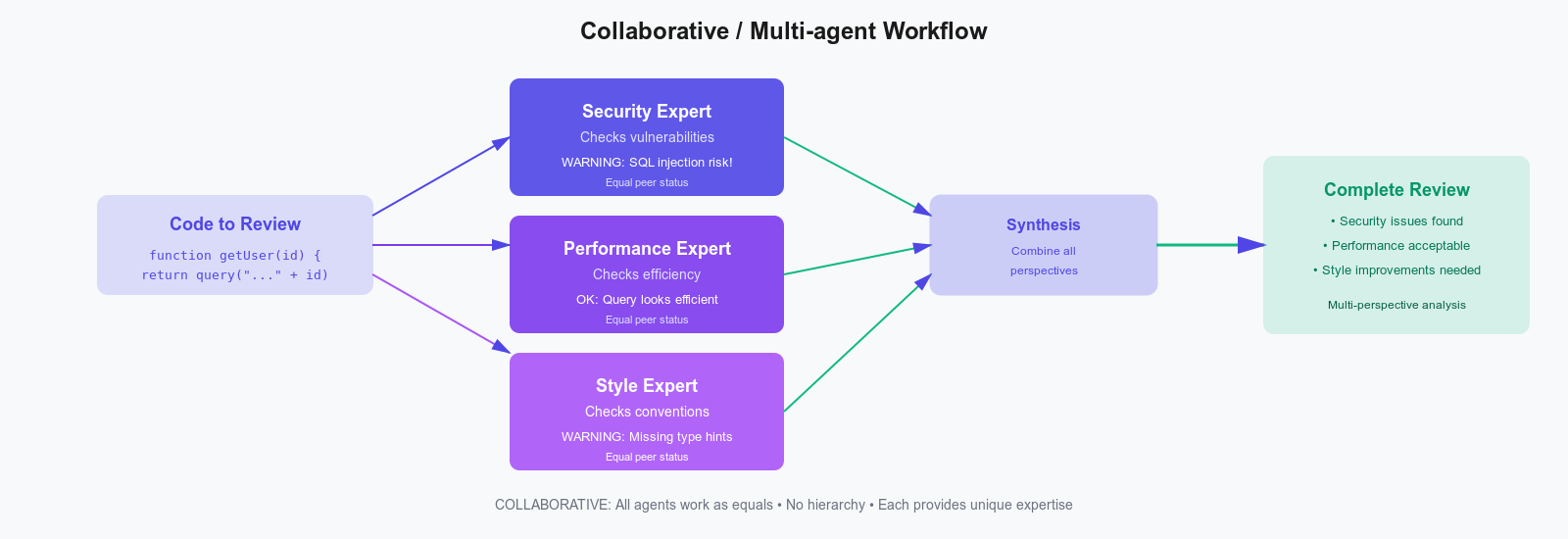
Collaborative approaches work well when diverse perspectives add real value—think investment analysis, content moderation, and hiring decisions.
Do not use this workflow if you can use a single expert agent or if coordination overhead outweighs benefits, or if multiple opinions create more problems than they solve.
Orchestrator–Worker Workflow
Orchestrator-Worker workflows use a central orchestrator to manage a pool of worker agents. The orchestrator is stateful and intelligent; the workers are stateless and interchangeable.
This separation brings powerful benefits: the orchestrator handles coordination (task distribution, load balancing, retry logic) while workers focus purely on execution. You can scale workers horizontally without touching orchestration logic. The trade-off is that the orchestrator becomes a single point of failure and a potential bottleneck.
Picture a document processing system: the orchestrator receives mixed file types, analyzes each, dynamically assigns PDFs to PDF workers, images to OCR workers, and spreadsheets to data workers, and then compiles the results into a unified format.
// PDF processor worker
const pdfWorker = new LlmAgent({
  name: "pdf_worker",
  description: "Extracts text and metadata from PDF files",
  tools: [new HttpRequestTool()],
  model: "gpt-4o",
});

// Image processor worker
const imageWorker = new LlmAgent({
  name: "image_worker",
  description: "Extracts text from images using OCR",
  tools: [new HttpRequestTool()],
  model: "claude-sonnet-4",
});

// Spreadsheet processor worker
const spreadsheetWorker = new LlmAgent({
  name: "spreadsheet_worker",
  description: "Extracts data from Excel and CSV files",
  tools: [new HttpRequestTool()],
  model: "gemini-2.5-flash",
});

// Orchestrator
const documentOrchestrator = AgentBuilder.create("document_orchestrator")
  .withDescription("Coordinates document processing across specialized workers")
  .withInstruction(`You are a document processing orchestrator.
    Analyze each document type and delegate to the appropriate worker:
    - PDF files → pdf_worker
    - Image files (JPG, PNG) → image_worker
    - Spreadsheets (XLS, XLSX, CSV) → spreadsheet_worker
    Track progress and compile all extracted data into a unified format.`)
  .withSubAgents([pdfWorker, imageWorker, spreadsheetWorker])
  .withModel("gpt-4o")
  .build();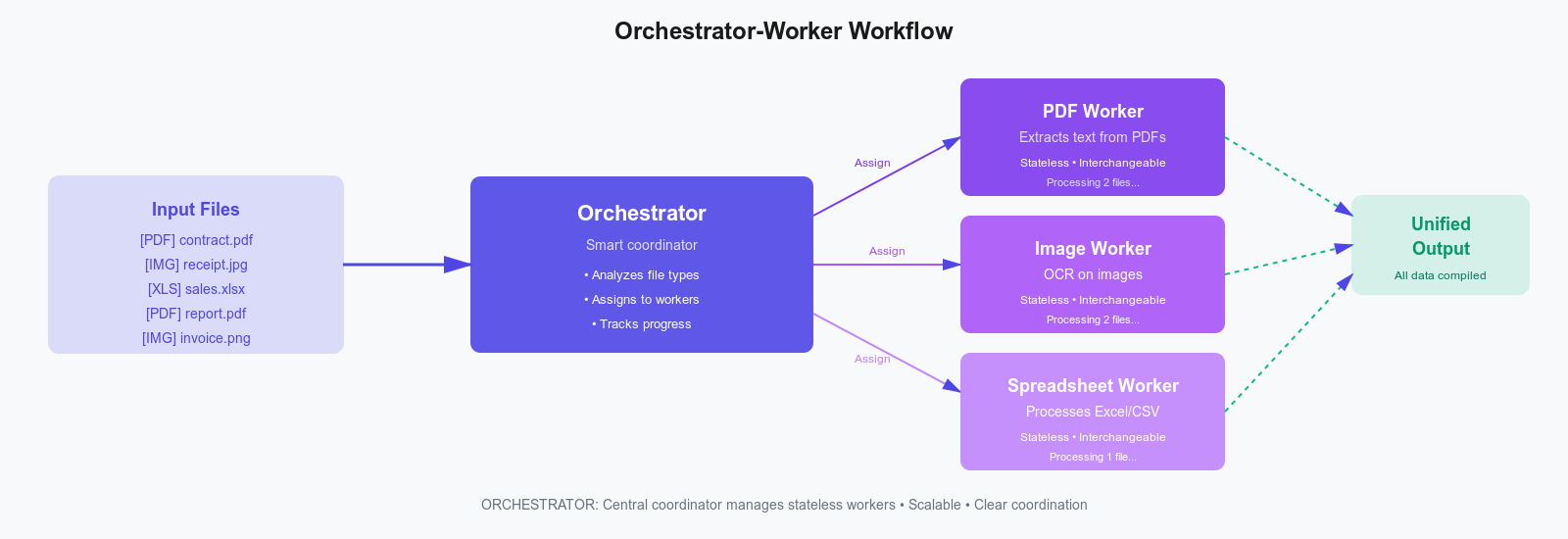
The orchestrator-worker workflow excels at managing large-scale parallel work, such as web scraping, batch data processing, and distributed test execution.
But it becomes an overkill if you are running a simple system with just a few agents, and risky when the orchestrator becomes a critical failure point.
Agentic Workflow Comparison Table
| Workflow | Best For | Pros | Cons | When NOT to Use | Real-world Examples |
|---|---|---|---|---|---|
| Sequential/Prompt Chaining | Step-by-step tasks | Simple, deterministic | Slow, linear bottleneck | When tasks are independent | Document pipelines, ETL processes |
| Parallel | Independent tasks | Fast, scalable | Hard to coordinate | When order matters | Multi-source aggregation, batch processing |
| Hierarchical | Complex decomposition | Natural task breakdown | Management overhead | When tasks are simple | Travel planning, software development |
| Adaptive/Dynamic | Variable inputs | Flexible routing | Unpredictable execution | When strict control is needed | Customer support routing, email triage |
| Collaborative/Multi-Agent | Multi-perspective problems | Diverse expertise | Coordination complexity | When agents would conflict | Code review, investment analysis |
| Orchestrator–Worker | Distributed processing | Clear coordination | Single point of failure | When the system is tiny | Web scraping, test execution |
Common Patterns Inside Agentic Workflows
Now that we understand workflows (the architecture), let's look at patterns (the behaviors). Patterns are reusable techniques that can be used in any workflow. While workflows define structure, patterns define behavior. The following the some of the most common patterns used in agent workflows:
Tool Use Pattern
The tool use pattern enables agents to interact with external systems through defined interfaces. Tools transform agents from chatbots limited to training data into action-taking systems that query databases, call APIs, and search the web.
This is the most fundamental pattern. Without tools, agents can't access real-time or business-specific data. The intelligence lies in the agent determining when to use tools, which tool to use, and how to extract correct parameters from natural language.
Example: A customer service agent analyzes "What's the status of order #12345?", recognizes it needs database access, selects the query_database_tool tool, extracts the order ID, fetches order details, and incorporates that real-time data into its answer.
import { LlmAgent, AgentBuilder, createTool } from "@iqai/adk";
import * as z from "zod";

// Mock database connection
const database = {
  query: async (sql: string, params: any[]) => {
    // Mock response
    return { id: params[0], email: "user@example.com" };
  },
};

// Custom database query tool
const databaseTool = createTool({
  name: "query_database_tool",
  description: "Queries the customer database for user information",
  schema: z.object({
    userId: z.string().describe("The user ID to query"),
    fields: z.array(z.string()).describe("Fields to retrieve"),
  }),
  fn: async ({ userId, fields }) => {
    // In production, this would hit your actual database
    const user = await database.query(
      `SELECT ${fields.join(",")} FROM users WHERE id = ?`,
      [userId]
    );
    return JSON.stringify(user);
  },
});

// Agent with tool
const customerAgent = new LlmAgent({
  name: "customer_agent",
  description: "Provides customer information",
  tools: [databaseTool],
  model: "gpt-4o",
});

export const getRootAgent = async () => {
  const { runner } = await AgentBuilder.create("root_agent")
    .withSubAgents([customerAgent])
    .build();

  const result = await runner.ask(
    "What is the email address for user ID 12345?"
  );
  console.log(result);
};
Tools become essential when agents need real-time data or must perform actions beyond text generation. You should skip them only if the agent's training data is sufficient or the security risks are too high.
Planning Pattern
The planning pattern has agents create explicit execution plans before taking action—the "look before you leap" approach. Complex tasks benefit from upfront decomposition, just like humans sketch architecture before coding.
Planning produces visible, inspectable strategies that you can validate before incurring the cost of execution. This transparency helps catch logical errors early and makes debugging easier. The tradeoff is latency—you're adding a planning phase before real work happens.
Example: A research agent creates a plan (search docs → find comparative analyses → identify differences → find examples → synthesize), then executes each step, adjusting if initial results suggest the query needs refinement.
import { LlmAgent, AgentBuilder, GoogleSearch } from "@iqai/adk";

const plannerAgent = new LlmAgent({
  name: "planner_agent",
  description: "Creates and executes research plans",
  instruction: `When given a research question:
    1. First, create a detailed research plan with specific steps
    2. For each step, identify what information you need to find
    3. Execute the plan step by step using available tools
    4. Synthesize findings into a comprehensive answer
    Always show your plan before executing it.`,
  tools: [new GoogleSearch()],
  model: "claude-sonnet-4",
});

export const getRootAgent = async () => {
  const { runner } = await AgentBuilder.create("root_agent")
    .withSubAgents([plannerAgent])
    .build();

  const result = await runner.ask(
    "What are the main differences between React Server Components and traditional React components?"
  );
  console.log(result);
};
The planning patterns really pay off for complex multi-step tasks where thinking ahead improves results. If your agent will be performing simple tasks, urgent requests, or operating in rapidly changing environments, then this pattern is not for you.
Routing Pattern
The routing pattern intelligently directs requests to the most appropriate handler—the traffic controller for your agent system. Not all requests are equal: some need expensive models, others can use cheap ones; some require specialized expertise, others need general knowledge.
Intelligent routing optimizes this heterogeneity by analyzing request characteristics (intent, complexity, domain) and directing to the best-suited handler. This enables adaptive workflows and prevents over-provisioning expensive resources for simple tasks.
For example, you would route "What is TypeScript?" to a fast, cheap model, but route "Compare TypeScript vs Flow type inference" to a more capable model, optimizing both quality and cost.
import { LlmAgent, AgentBuilder } from "@iqai/adk";

// Simple queries agent
const quickAgent = new LlmAgent({
  name: "quick_agent",
  description: "Handles simple, straightforward queries",
  model: "gemini-2.5-flash", // Faster, cheaper model
});

// Complex queries agent
const deepAgent = new LlmAgent({
  name: "deep_agent",
  description: "Handles complex, multi-step queries",
  model: "claude-sonnet-4", // More capable model
});

export const getRootAgent = async () => {
  // Router with complexity detection
  const routerAgent = AgentBuilder.create("router_agent")
    .withDescription("Routes queries based on complexity")
    .withInstruction(
      `Analyze each query and route appropriately:
    - Simple factual questions, definitions, basic info → quick_agent
    - Complex analysis, multi-step reasoning, research → deep_agent
    Consider: Does this need deep thinking? Multiple steps? Nuanced analysis?`
    )
    .withSubAgents([quickAgent, deepAgent])
    .withModel("gpt-4o")
    .build();

  const { runner } = await routerAgent;

  // This should route to quick_agent
  const simple = await runner.ask("What is TypeScript?");

  // This should route to deep_agent
  const complex = await runner.ask(
    "Compare type inference in TypeScript vs Flow, considering edge cases and performance"
  );
};
Using smart routing would save you a lot of money when workloads vary significantly in complexity, but if all your queries require similar workflows or if mistakes cost more than you save, then the routing pattern should not be used.
Reflection Loop / Evaluator-Optimizer Pattern
The reflection pattern requires agents to assess their outputs and improve iteratively, emphasizing self-correction and the principle of "measure twice, cut once." First-draft outputs often show quality issues that become evident upon thorough inspection.
By adding explicit critique and revision, you improve quality while increasing latency and API calls. A critic assesses based on established criteria such as correctness, efficiency, and security, offering actionable feedback. The generator then revises accordingly, establishing an improvement loop.
Example: Generate SQL query → critic evaluates for security/efficiency → provides feedback ("vulnerable to SQL injection") → generate improved version → repeat until approved or max iterations reached.
import { LlmAgent, AgentBuilder } from "@iqai/adk";

// Generator agent
const generatorAgent = new LlmAgent({
  name: "generator_agent",
  description: "Generates SQL queries from natural language",
  instruction: "Convert user requests into SQL queries",
  model: "gpt-4o",
});

// Critic agent
const criticAgent = new LlmAgent({
  name: "critic_agent",
  description: "Evaluates SQL query quality",
  instruction: `Evaluate SQL queries for:
      - Correctness (does it match the request?)
      - Efficiency (are there better approaches?)
      - Security (SQL injection risks?)
      - Best practices (proper JOINs, indexing considerations?)
      If issues found, provide specific feedback for improvement.`,
  model: "claude-sonnet-4",
});

export const getRootAgent = async () => {
  // Root agent (Orchestrator)
  const rootAgent = AgentBuilder.create("reflection_workflow")
    .withDescription("SQL query generation with iterative improvement")
    .withInstruction(
      "You manage the SQL generation process. Delegate generation to generator_agent and evaluation to critic_agent."
    )
    .withSubAgents([generatorAgent, criticAgent])
    .withModel("gpt-4o")
    .build();

  const { runner } = await rootAgent;

  // Reflection Workflow Logic
  const request =
    "Get all users who made purchases over $1000 in the last month";
  const maxIterations = 3;

  // Step 1: Generate initial query
  let currentQuery = await runner.ask(`Generate SQL query for: ${request}`);
  let iteration = 0;

  while (iteration < maxIterations) {
    // Step 2: Critique
    const critique = await runner.ask(
      `Evaluate this SQL query:\n${currentQuery}\n\nOriginal request: ${request}`
    );

    if (critique.includes("APPROVED") || critique.includes("looks good")) {
      console.log("Query approved!");
      return currentQuery;
    }

    // Step 3: Improve
    currentQuery = await runner.ask(
      `Improve this query based on feedback:\n${currentQuery}\n\nFeedback: ${critique}`
    );
    iteration++;
  }

  return currentQuery;
};
Reflection loops are useful for high-stakes outputs with defined quality criteria. They should not be used when speed is critical or when "good enough" is subjective.
Human-in-the-Loop Pattern
The human-in-the-loop pattern pauses agent execution at critical points to request human input or approval. It combines AI automation with human judgment for decisions too significant for autonomous agents, eg, financial transactions, content publication, and data deletion.
AI handles the tedious work while humans make the final call on high-stakes decisions. This builds trust in agent systems and ensures appropriate oversight.
An example is a content agent who researches, drafts, and formats an article, then pauses to present the draft to a human editor who reviews for accuracy and tone, approves or requests revisions, with the agent acting on that decision.
import * as z from "zod";
import * as readline from "readline";
import { createTool, AgentBuilder } from "@iqai/adk";

// Human approval tool
const requestApprovalTool = createTool({
  name: "request_approval_tool",
  description: "Request human approval before proceeding with an action",
  schema: z.object({
    action: z.string().describe("The action requiring approval"),
    context: z.string().describe("Context and reasoning for the action"),
    risk_level: z
      .enum(["low", "medium", "high"])
      .describe("Risk level of the action"),
  }),
  fn: async ({ action, context, risk_level }) => {
    console.log("\n🚨 HUMAN APPROVAL REQUIRED 🚨");
    console.log(`Action: ${action}`);
    console.log(`Context: ${context}`);
    console.log(`Risk Level: ${risk_level}`);

    const rl = readline.createInterface({
      input: process.stdin,
      output: process.stdout,
    });

    const response = await new Promise<string>(resolve => {
      rl.question("\nApprove this action? (yes/no/modify): ", answer => {
        rl.close();
        resolve(answer.toLowerCase());
      });
    });

    if (response === "yes") {
      return "APPROVED: Proceed with the action";
    } else if (response === "no") {
      return "REJECTED: Do not proceed with the action";
    } else {
      return "MODIFY: Provide alternative approach based on human feedback";
    }
  },
});

// Content publisher agent with human-in-the-loop
export const getRootAgent = async () => {
  const contentPublisherAgent = AgentBuilder.create("content_publisher_agent")
    .withDescription("Publishes content with human approval")
    .withInstruction(
      `You help publish content to production.
      Before publishing, always use request_approval_tool to get human review.
      Provide clear context about what you're publishing and why.
      Only proceed if you receive APPROVED status.`
    )
    .withTools(requestApprovalTool)
    .withModel("gpt-4o")
    .build();

  const { runner } = await contentPublisherAgent;

  // Example usage: Draft and publish content with human approval
  const result = await runner.ask(
    "Draft and publish a blog post about our new features"
  );

  console.log("Final result:", result);
  return result;
};
Human oversight is needed for high-stakes decisions or regulatory compliance, but it’s not practical for low-risk choices or when there are too many cases for people to review.
Choosing the Right Agentic Workflow
Selecting the right workflow is crucial. The wrong choice leads to unnecessary complexity and poor performance. Here's a practical framework:
Start with the task structure. Analyze the problem before thinking about technology. Does it have a clear sequence? Independent subtasks? Specialized domains? The task structure often suggests the workflow naturally.
Choose the workflow that fits. Avoid overengineering. If a sequential chain suffices, don't jump to hierarchical delegation. Simplicity aids maintainability.
Combine workflows when appropriate. Real systems often use multiple workflows—don't force everything into one pattern.
Start simple. When in doubt, start with Sequential or Parallel workflows. Add complexity only when you have evidence that simpler patterns aren't sufficient.
Consider operational constraints. Factor in debuggability, latency budget, cost sensitivity, and oversight needs.
Building Blocks of Agentic Workflows
Every agentic workflow combines five fundamental components:
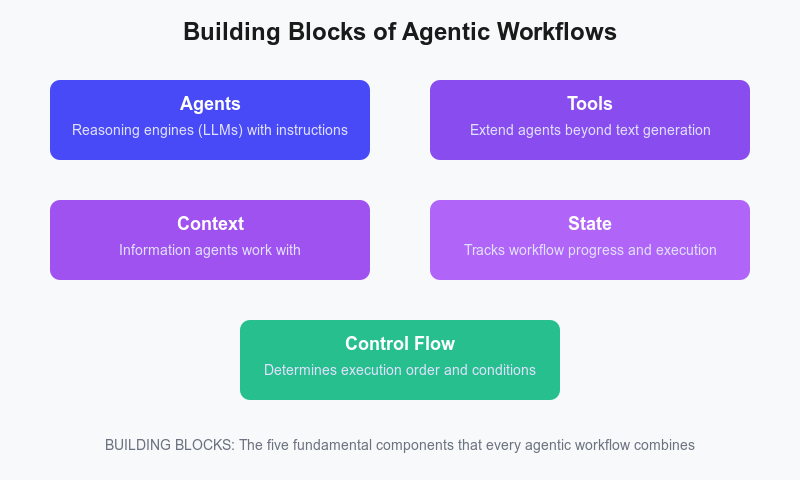
Agents are your reasoning engines—LLMs configured with specific instructions and capabilities. They're the workers who execute tasks.
Tools extend what agents can do beyond text generation. They let agents query databases, call APIs, search the web, and interact with external systems.
Context is the information agents work with—conversation history, previous outputs, and relevant documents. Effective workflows control the flow of context between agents.
State tracks where you are in the workflow—which agents have run, what they produced, and what happens next. This is critical for error handling and recovery.
Control Flow determines execution order—which agents run, when, and under what conditions. This is what makes each workflow type unique.
Modern frameworks like ADK-TS handle the complex orchestration, letting you focus on designing the workflow logic rather than building infrastructure from scratch.
Conclusion
Agentic workflows are the backbone that determines whether your agent system can handle real-world complexity—or falls apart under the pressure. By getting familiar with the six main workflows and five essential patterns, you’ll have the knowledge and know-how to create smart, manageable systems.
Real-world systems usually blend multiple workflows and patterns together. Use hierarchical delegation to tap into specialist knowledge, run tasks in parallel to boost speed, add reflection loops to improve quality, and put a human in the loop when safety matters. These building blocks are meant to fit together, so you can mix them as needed.
Want to apply what you just learned? The ADK-TS framework includes ready-made versions of these workflows and patterns. You can browse the examples directory, start with a template, or dive into the docs. Begin simple, test how things work in practice, and make changes based on what you learn.
The agent systems that really work aren’t the ones with the flashiest or most complicated workflows—they’re the ones where the workflow truly matches the task, the patterns solve real problems, and the developers know when and why to use each approach. Now you have the foundation to do just that.
Further Reading & Useful Resources
If you'd like to explore more about agentic systems, workflows, and AI tooling, here are some helpful resources:
- Build your first AI agent in TypeScript with ADK-TS https://blog.iqai.com/build-ai-agent-in-typescript-with-adk-ts/
- Learn prompt engineering fundamentals https://cloud.google.com/discover/what-is-prompt-engineering
- Understanding workflows in modern AI systems https://www.ibm.com/think/topics/workflow
- Designing effective writing tools for AI agents https://www.anthropic.com/engineering/writing-tools-for-agents
- How to design a multi-agent intelligence system https://developer.microsoft.com/blog/designing-multi-agent-intelligence
- How Anthropic built their multi-agent research system https://www.anthropic.com/engineering/multi-agent-research-system


